
A study of NoSQL document databases
Introduction
SQL style databases deal with structured data in the form of rows and columns organized into tables. A lot of real world data, however, is unstructured which created the necessity for NoSQL databases.
Document-oriented databases or document stores are a category of NoSQL databases that stores data in the form of documents. They are inherently extended key-value stores but the document store relies on the internal structure of the document to extract metadata. They contrast strongly with relational databases as they store all information for a given object in a single instance in the database. Every object can have a different schema and is self-describing.
Pros of document DBs
- Schema-less, hence no restrictions in format and structure
- Minimal maintenance is required once document is created
- No foreign keys, documents can be independent of one another
Cons of document DBs
- Breaks atomicity requirements
- Security is still a major existing challenge
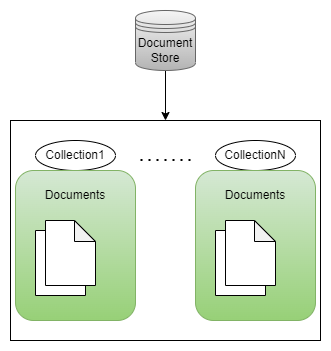
What is a document
A document is the central concept of document stores. In general, documents encapsulate and encode data in some standard format or encoding like XML, JSON, BSON. A document has a flexible schema where attributes can be added or removed at runtime. They are roughly equivalent to the programming concept of an object where each instance can look very different
A sample document encoded in JSON can look like this:
{
     "_id" :  1,
     "first_name" : "Tom",
     "email" : "tom@example.com",
     "cell" : "765-555-5555",
     "hobbies" : ["cooking", "coding"]
}
Unlike relational databases, document stores have all data for an object in a single document entry and no additional work is required to retrieve the related data. Relationship between documents can be modelled by either embedding or referencing documents.
Core operations of CRUD(Create, Retrieve, Update, and Delete) are similar to other databases. Some popular document stores are MongoDB, DocumentDB, Aerospike, and CouchDB.
Mapping between SQL and MongoDB
| SQL terminology | MongoDB terminology |
|---|---|
| Database | Database |
| Table | Collection |
| Row | BSON document |
| Column | Field |
| Primary key | ObjectID |
| SELECT * FROM table | db.table.find() |
| SELECT id, user_id, status FROM people | db.people.find( {}, {user_id : 1, status : 1}) |
Indexing
Indexing is essential to speed up data retrieval operations and avoid slow, inefficient full collection scans.
MongoDB Indexing
MongoDB uses one of two indexing methods:
- User-defined shard key index made up of one or more fields that appear in all documents
- Hashed index on a single field that must appear in every document
By default, all collections have a unique index on the “_id” field
Shard key index
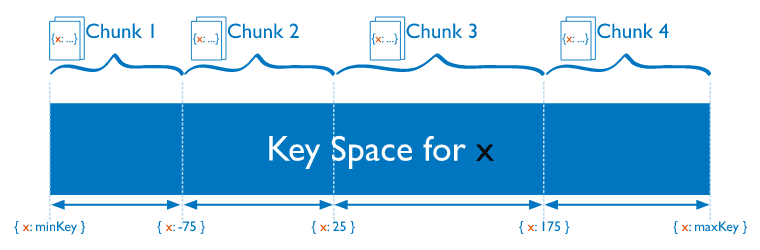
Data is distributed among shards and a shard key is used to distribute a collection’s documents across shards. Shard keys determine which shard contains the document based on values in the fields chosen to index
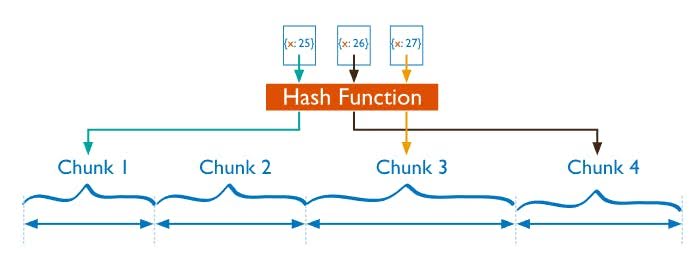
Another strategy involves computing hash of the shard key field’s value and assigning ranges to chunks based on the hashed shard key values
This strategy facilitates more even data distribution however they do not provide efficient range-based operations. While a range of shard keys may be “close”, their hashed values are unlikely to be on the same chunk
Read further on shard key selection strategies and index data structures in the mongoDB manual or below pdf
MongoDB also uses the ESR(Equality, Sort, Range) rule to create indexes for efficient querying.
Consider query: db.table.find({a: 1, b: {$gt: 2}}).sort({c: 1}) where all documents from table collection that have a=1,b>2 is sorted by c in increasing orderThe compound index that is valid for this query is (a,c,b) to follow the ESR rule
If using two indexes, we can use a single index b and a compound index (a,c). This also follows ESR rule where we separate the ES and R
Conclusion
The four examples of document stores mentioned above are very similar with differing approaches in bulk operations, disk vs memory residency, indexing limitations, etc.
Although MongoDB seems to be the most versatile document store for most cases, there are scenarios where each may prove the better option.